Every ad break answers one question: where is the ad decided?
Comparing ad insertion techniques feature by feature hides what matters. A more useful starting point is one question: at what point in the delivery chain is each viewer's ad chosen? The answer determines which devices you reach, what your CDN can cache, how exposed your breaks are to ad blockers, what you can measure and which ad formats you can sell. Client-side ad insertion (CSAI), server-side ad insertion (SSAI) and server-guided ad insertion (SGAI) each give a different answer.
CSAI: the player decides, with an ads SDK in the app
In CSAI, the decision lives on the device. An ads SDK inside the app watches for ad markers; at each one, the player pauses the content, requests an ad and resumes when it ends. The request can use data from the viewing session, the player can handle different media types, and interaction metrics are typically more accurate because delivery happens on the client.
The trade-offs come from the same place. Results depend on each client's capabilities, pausing to load an ad can cause buffering or latency, and the pause, request and resume cycle makes ads easier for ad blockers to detect.
AD BREAK
- Signal. An ad marker travels with the content to the player.
- Request. The ads SDK pauses the content and requests an ad, with data from the viewing session.
- Ad returned. The player loads the ad it received.
- What the viewer sees. The ad, then the content resumes. Loading the ad can cause buffering.
SSAI: the server decides and builds a manifest for each viewer
In SSAI, the decision moves to the server. Ads are fetched ahead of the break and stitched into the stream, matched to its bitrate, frame rate and audio level. With no ad logic in the client, the experience is more consistent across platforms and devices, and ad blockers are less effective at identifying stitched ads.
The cost is that the server has to generate and serve a personalized manifest for each session. That is the only per-viewer piece: the video segments of the content and of the ads remain cacheable, so SSAI does not duplicate the video for every viewer. For ad ops, two more limits apply: fetched ads cannot be adjusted in the moment, and viewability and interaction metrics need additional mechanisms. Adding client-side tracking makes those ads susceptible to ad blockers again.
AD BREAK
- Signal. A SCTE-35 cue marks the ad break in the live stream.
- Request. The packager asks the ad server for each viewer's ad, ahead of the break.
- Ad returned. The ad is stitched into a manifest built for that viewer's session.
- What the viewer sees. One continuous stream, with the ad already inside it.
#EXTM3U
#EXT-X-TARGETDURATION:6
#EXTINF:6.0,
https://cdn.example.com/game/seg-101.ts
#EXT-X-DISCONTINUITY
#EXTINF:6.0,
https://ads.example.com/creative-a/seg-1.ts
#EXTINF:6.0,
https://ads.example.com/creative-a/seg-2.ts
#EXT-X-DISCONTINUITY
#EXTINF:6.0,
https://cdn.example.com/game/seg-102.ts#EXTM3U
#EXT-X-TARGETDURATION:6
#EXTINF:6.0,
https://cdn.example.com/game/seg-101.ts
#EXT-X-DISCONTINUITY
#EXTINF:6.0,
https://ads.example.com/creative-b/seg-1.ts
#EXTINF:6.0,
https://ads.example.com/creative-b/seg-2.ts
#EXT-X-DISCONTINUITY
#EXTINF:6.0,
https://cdn.example.com/game/seg-102.tsSGAI: the server marks the break once and each player requests its ad
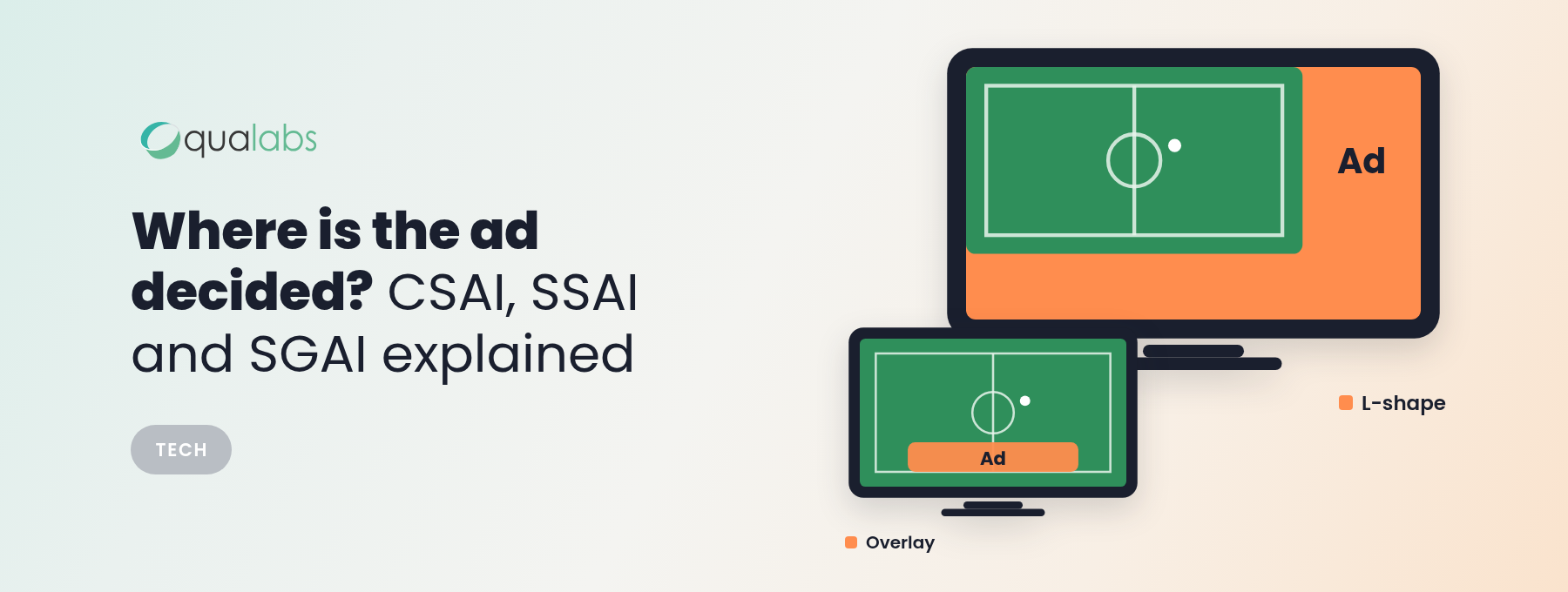
In SGAI, the server signals the break once, in a manifest that is the same for every viewer, and each player requests its own ad when it reaches the break. Because ads are referenced as separate assets instead of being stitched into the media playlists, the manifest can be cached. The ad decision leaves the video pipeline: ads are scheduled on the content timeline as separate assets, which allows late-binding ad decisioning without conditioning ads with the primary content. SGAI also enables formats that are hard to stitch, such as overlays, L-shape and squeezeback.
SGAI has limits. It needs player support: a player that does not implement it ignores the break and keeps playing the content, and support varies between players today. Against ad blockers, SGAI sits between the other two: the break is signaled by the server in the standard manifest, without an ads SDK, but the ad is still a separate request made by the player.
AD BREAK
- Signal. The packager marks the break once, in the manifest that every viewer shares.
- Request. When it reaches the break, each player asks the ad server for its own ad.
- Ad returned. One ad or a list of ads, referenced as separate assets.
- What the viewer sees. Its own ad, then the content. A player without SGAI support keeps playing the content.
CSAI, SSAI and SGAI side by side
| Aspect | CSAI | SSAI | SGAI |
|---|---|---|---|
| Where the ad is decided | PlayerIn the player, through an ads SDK in the app, using data from the viewing session. | ServerOn the server, which fetches the ads and stitches them into the stream. | Server + playerThe server places the break once for everyone. Each player requests its ad at break time. |
| Manifest and CDN cache | UnchangedThe content manifest does not change. The player requests the ad separately. | Per sessionOne personalized manifest per session. Content and ad segments remain cacheable. | One for allOne manifest for all viewers, which can be cached. Ads are referenced as separate assets. |
| Devices | Client-dependentDepends on the capabilities of each client. | ConsistentMore consistent across a wide range of platforms and devices. | Player supportNeeds player support. Players without it ignore the break and keep playing the content. |
| Ad blockers | More exposedMore exposed, because of the pause, request and resume cycle on the client. | Less exposedLess exposed: stitched ads are harder to identify. | In betweenIn between: no ads SDK, but the player makes a separate ad request. |
| Measurement | Client-sideInteraction metrics are typically more accurate, because delivery happens on the client. | Extra mechanismsViewability and interactions need additional mechanisms. | Player beaconsThe player sends impression and quartile beacons. In MPEG-DASH, tracking information from a VAST response can travel with the break. |
| Possible formats | Varied mediaDifferent media types, adjusted to the viewing session. | LinearLinear ads stitched into the stream. Some interactive or dynamic creatives may not be fully supported. | Linear + non-linearLinear breaks plus non-linear formats such as overlays, L-shape and squeezeback. |
| Startup and sync | Can bufferPausing to load an ad can cause buffering or latency. | SmoothSmoother transitions, but ads cannot be adjusted once fetched. | Late bindingThe player loads the ad after buffering the content. The break can snap to segment boundaries, and a live stream resumes at the live edge. |
Teal marks a strength, orange a cost to plan for and gray a neutral trait.
How HLS and MPEG-DASH signal a server-guided break
In HLS, the server schedules an interstitial by placing an EXT-X-DATERANGE tag in the media playlists of the primary content. The tag points to the ad in one of two ways. X-ASSET-URI points directly to a single interstitial asset, which works when the ad is known when the playlist is written. X-ASSET-LIST points to a JSON object that the player resolves at playback time. It lists each ad with its URI and duration, and an empty list tells the player to skip the break and continue with the content. Other attributes set where the content resumes (X-RESUME-OFFSET), cap playout time (X-PLAYOUT-LIMIT) and snap the break to segment boundaries (X-SNAP). Interstitials must be VOD assets, scheduled against VOD or live content. All of this is defined in the current IETF draft of the HLS specification.
#EXTM3U
#EXT-X-TARGETDURATION:6
#EXT-X-PROGRAM-DATE-TIME:2026-11-25T20:00:00.000Z
#EXTINF:6.0,
game-001.mp4
#EXTINF:6.0,
game-002.mp4
#EXT-X-DATERANGE:ID="break-1",CLASS="com.apple.hls.interstitial",
  START-DATE="2026-11-25T20:00:12.000Z",DURATION=30.0,
  X-ASSET-URI="https://ads.example.com/ad-1/main.m3u8",
X-SNAP="OUT,IN"#EXT-X-DATERANGE:ID="break-1",CLASS="com.apple.hls.interstitial",
START-DATE="2026-11-25T20:00:12.000Z",DURATION=30.0,
X-ASSET-LIST="https://ads.example.com/breaks/break-1.json"{
"ASSETS": [
{
"URI": "https://ads.example.com/ad-1/main.m3u8",
"DURATION": 15.0
},
{
"URI": "https://ads.example.com/ad-2/main.m3u8",
"DURATION": 15.0
}
]
}{ "ASSETS": [] }MPEG-DASH 6th edition does the same with Alternative MPD events. An InsertPresentation event inserts an alternative presentation at a point in playback, and the original content resumes afterward, which fits VOD. A ReplacePresentation event replaces the current presentation for a period, which fits live ad breaks and regional blackouts, and it can set a maximum duration and a resumption point. ListMPD lets the player assemble a break from a list of ad MPDs instead of the server merging them, and it can be built from a VAST response with its tracking information. The DASH-IF reference implementation uses a ReplacePresentation event per break whose URI returns a personalized List MPD.
<!-- Live MPD: the same for every viewer (simplified) -->
<MPD type="dynamic" ...>
  <Period id="1" start="PT0S">
    <EventStream schemeIdUri="urn:mpeg:dash:event:alternativeMPD:replace:2025"
                 timescale="90000">
      <Event id="1" presentationTime="2700000" duration="1800000">
        <ReplacePresentation
            uri="https://ads.example.com/sgai/ads?break=1"
            maxDuration="1800000" clip="true"/>
      </Event>
    </EventStream>
    <AdaptationSet ...> ... </AdaptationSet>
  </Period>
</MPD>
<!-- List MPD returned to one viewer (simplified) -->
<MPD type="list" profiles="urn:mpeg:dash:profile:list:2024">
<Period id="1">
<ImportedMPD>https://ads.example.com/ad-1/manifest.mpd</ImportedMPD>
</Period>
<Period id="2">
<ImportedMPD>https://ads.example.com/ad-2/manifest.mpd</ImportedMPD>
</Period>
</MPD>Non-linear formats and our work on SGAI
When the player composes content and ad, the ad does not have to replace the content. Overlays, L-shape and squeezeback show both on screen at once, and they cannot really be stitched into the stream. They depend on the same condition as any SGAI break: player support.
At Qualabs, our team worked on the SGAI specification for MPEG-DASH, for both linear and non-linear ads. We also built the demo of non-linear ads in HLS that was shown at HLS Interest Day.
How to choose an ad insertion approach
- List the devices and players you must reach, and check which of them support HLS interstitials or MPEG-DASH Alternative MPD events.
- Estimate your peak concurrent sessions, because SSAI generates and serves one manifest for each of them.
- Decide how much ad-blocker exposure you can accept on each platform.
- Agree with your buyers on the metrics they require and on where each beacon will fire.
- Decide whether you plan to sell non-linear formats, which need SGAI and player support.
- Plan a fallback for players without SGAI support, such as serving them stitched sessions from the same setup.
Do the players you must reach support HLS interstitials or DASH Alternative MPD events?
Do you expect large peaks of concurrent sessions?
How much ad-blocker exposure can you accept?
Will you sell overlays, L-shape or squeezeback?
A mixed fleet does not force one answer: the same setup can serve stitched sessions to players without SGAI support.
SSAI + SGAIFAQ about ad insertion
What is the difference between CSAI, SSAI and SGAI?
Where each viewer's ad is decided: in the player for CSAI, on the server for SSAI, and split for SGAI, where the server marks the break once and each player requests its ad.
Does SSAI duplicate the video for every viewer?
No. The video segments of the content and of the ads remain cacheable, and what is generated per viewer is the manifest.
What happens if a player does not support SGAI?
It ignores the break signaling and keeps playing the content, so the viewer sees the content instead of an ad.
Is SGAI immune to ad blockers?
No. It does not need an ads SDK in the app, but the player still requests the ad separately, which leaves it between CSAI and SSAI.
Can SSAI and SGAI run together?
Yes. One setup can let each session choose stitched or guided insertion, so players without SGAI support still receive ads.
Every ad break is an engineering decision
Which one scales better?
Video engineering for streaming and broadcast